The Best Android VPN for Secure & Fast Browsing

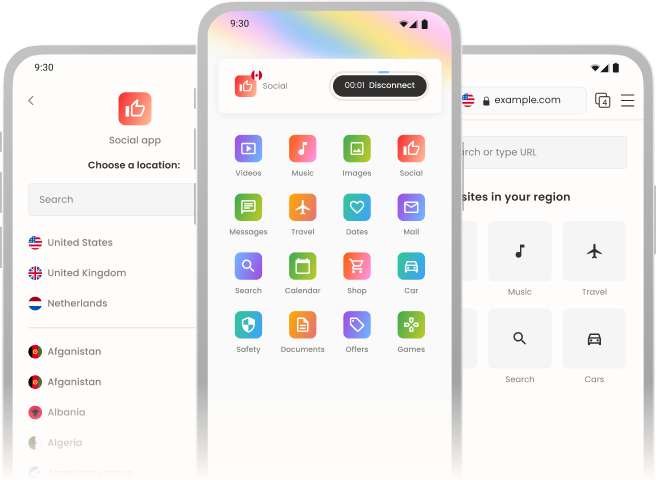
Enjoy private browsing, unblock websites and stream content from anywhere with lightning-fast connections Hola’s Android VPN app.
 
 
image
 

Why choose Hola VPN for Android?

image

Access Global Content

Whether you're traveling or want to access content from another country, Hola VPN makes it easy.

image

Fast and reliable connection

High-speed servers ensures smooth browsing, streaming, and gaming with minimal buffering

image

Private and secure browsing

Hide your IP address and encrypt your traffic to protect your data from hackers, ISPs, and third parties.

image

Easy-to-use app

Connect to Hola VPN with just one tap. Fast and secure browsing in seconds.

image

No bandwidth limits

Enjoy unlimited browsing and streaming without worrying about data caps or slow speeds.
image

Use Hola VPN on all your devices

One account covers multiple devices, including iPhone, iPad, Mac, Windows, and Android.


How to set up Hola VPN on Android

image

Get Hola VPN from Google Play

Tap the download button and install Hola VPN on Android phone or tablet

image

Connect to anywhere in the world

Tap “Connect” to instantly access the content you like.


Advanced features for a better VPN experience

image

Smart location selection

Automatically connect to the fastest and most stable server for your location.

image

Multi-access connection

The best type of connection is selected for you to get you the access you deserve

image

Optimized connection

The Hola VPN optimizes the connection to suit your needs on every use.


store image

Google Play

Don’t just take our word for it

 

Common questions people ask

What is Hola VPN for Android?

Hola VPN for Android is a free and easy-to-use VPN that allows you to access websites, apps, and streaming services from anywhere in the world. It encrypts your internet connection, hides your IP address, and helps you bypass geo-restrictions for a secure and unrestricted browsing experience.

How does Hola VPN work?

Hola VPN routes your internet traffic through a global network of servers, allowing you to appear as if you're browsing from a different country. This helps you unblock content, enhance privacy, and improving the security of your connection on public Wi-Fi.

What makes Hola VPN unique?

✅ Completely Free – No hidden costs or forced trials. ✅ Fast & Reliable – Enjoy smooth browsing and streaming. ✅ Easy to Use – One-tap connection, no setup required. ✅ Global Network – Connect to servers in multiple countries. ✅ App-Specific VPN – Choose which apps use the VPN. ✅ No Ads – Unlike many free VPNs, Hola offers an ad-free experience.

Can I use Hola VPN for streaming?

Yes! Hola VPN helps you access geo-restricted content on most popular platforms. However, streaming services may update their restrictions, so availability can vary.

How do I install Hola VPN on my Android device?

Download & Install – Get Hola VPN from the Google Play Store, Huawei AppGallery or Amazon Connect & Browse – Open the app, tap to connect, and enjoy a secure internet experience.

How do I change my VPN location?

Simply open the Hola VPN app, select a country from the list, and connect. Your internet traffic will be routed through that location.

Can I use Hola VPN on multiple devices?

Yes! You can use Hola VPN on Android phones, tablets, and other devices. If you have a Hola Premium subscription, you can use it on up to 10 devices.

Is Hola VPN safe to use?

Yes, Hola VPN is safe to install and use. It encrypts your internet traffic and protects your data from hackers, ISPs, and surveillance.

Does Hola VPN log my data?

Hola VPN only collects data on your in-app activity to enhance service performance. We never collect any of your personal information. Please refer to our Privacy Policy for further details.

Does Hola VPN use my device as a peer?

No, the Hola android VPN app on the Google play store is not used as a peer in the Hola P2P network.

Is Hola VPN encrypted?

Yes! Hola VPN uses industry-standard encryption protocols to secure your internet traffic. Please be aware that Hola VPN android app may use proxy split tunneling, meaning not all traffic is encrypted.

Is Hola VPN free?

Yes! Hola VPN offers a free version with some limitations, most of our users find the free version the best in the VPN android app category but if you need unlimited VPN time and faster speeds, you can upgrade to Hola Premium with the best value for money in the market.

What are the benefits of Hola Premium?

🔹 Unlimited VPN time – No session limits. 🔹 Faster speeds – High-performance servers. 🔹 No peer-to-peer usage – Your device won’t be used as a node. 🔹 Multi-device support – Use on up to 10 devices.

How do I subscribe to Hola Premium?

You can subscribe to Hola Premium directly from the app or via the Hola website .

Is using Hola VPN legal?

Yes, using a VPN is legal in most countries. However, some regions restrict or ban VPN usage, so check your local laws before using Hola VPN.

Can Hola VPN unblock geo-restricted content?

Yes! Hola VPN allows you to access blocked websites and streaming services by changing your virtual location. However, some platforms may block VPNs, so results may vary.

Why is Hola VPN not working?

If Hola VPN isn’t working, try the following: ✔ Restart the app and try reconnecting. ✔ Switch to a different server location. ✔ Clear the app cache in your Android settings. ✔ Check your internet connection. ✔ Disable other VPN or proxy apps that may conflict with Hola

Why does the free version have a time limit?

Hola VPN’s free version provides limited daily usage. Once you reach the limit, you’ll need to wait before reconnecting. To enjoy unlimited VPN time, upgrade to Hola Premium.

How do I uninstall Hola VPN?

Open Google Play Store. Go to My Apps & Games > Installed Apps. Find Hola VPN and tap Uninstall.

How do I contact Hola VPN support?

For any issues or questions, contact our support team at help_android@hola.org .


Try the Best Android VPN — Download Hola VPN for Android Now!